
Client Brief and Mind map
For my client, I am required to create ideas for designing what content I will be making which will be presented to the client for feedback before making the final touches to the project. I have used Miro to create a mind map of different ideas that can be created depending on the classes’ areas of interests (4 to choose from: Animation, Graphics, TV/Film Production and Photography).
I have discussed in class as to which kind of content I want to create for the client, so I have decided to go with creating content in the areas of animation and graphics like creating a short animation for the company logo that spins or an animation cycle of someone running which could be implemented in between or at the end of the recordings of A Roll and B Roll for a promotional video.
As for the remaining areas, my classmates Andrew and Oliver can work on the areas of TV/Film Production and Photography to create content like vox pops for informal interviews of pupils (permission required) and staff that are part of after school clubs and communities as well as group photographs of pupils and staff.
Here is the mind map of some of the classes’ ideas in a zoomed in view:


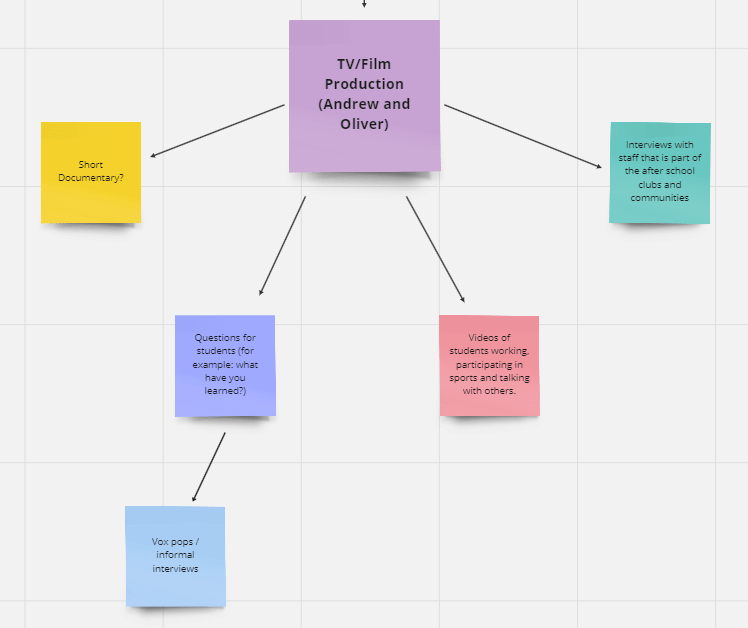
Full view:

Weekly Schedule
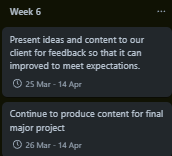
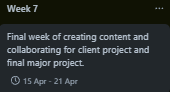
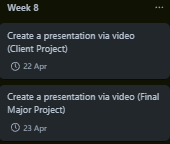
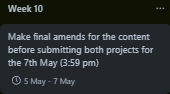
As a way to keep track of my progress for the client project and final major project, I used Trello to create a weekly schedule of what I will do each week which is shown below:



Proposal (Final Major Project)
For my final major project, I wanted to create a short animation that features characters that I will model myself, wielding different types of weapons in the theme or genre of my choice. I’ve chosen to do a short animation for my project because I’ve considered trying out 3D animation which requires the skills to model characters before animating them rather than myself trying to draw characters from the back, front and sides in 2D animation (frame by frame). In a different project such as the RIG-B National Competition (completed in 2023), I have acquired skills to texture a model so this time I want to use those skills to help me with applying materials to models before trying to animate them. The theme of my animation will be “future” (Sci-Fi genre) so I will create characters that are robotic or armoured that will hold different type of weapons and fight each other. As for my choice of software, I will use Blender to create the models of my characters and animate them because I want to try something new by doing 3D animation instead of 2D animation to test my current skills and skills that I will learn to see which type of animation is better suited for me to use in future projects. I am also aware that 3D animation can take some time because there is a lot for me to learn since I want to transition over from 2D animation to 3D animation and it is just as difficult for me to do so this will be worth it if I am able to get what I wish to achieve (using the skills that I have learnt so far) to create a product with the limited amount of time I have got (including the creation of pre-production material like a storyboard and concept art).
The skills that I currently have are the keyboard shortcuts in Blender which are for moving, rotating, scaling, placing new objects, viewing objects in the scene from each angle (including the camera), zooming in on selected objects, changing the view to local, duplicating objects, and moving the 3D cursor. I also have skills for certain tools in Edit Mode such as extruding and bevelling objects and applying materials to objects using the shading viewport which allows me to create emissive coloured materials before rendering the scene. Some of the skills that I have already learned had been carried over from 3ds Max as I learnt about 3D modelling in that software first before using them again in Blender. The skills I have yet to develop or learn are advanced techniques for editing and other techniques such as sculpting, vertex painting, weight painting, texture painting, UV editing, animating (using the timeline at the bottom of the screen), compositing, using geometry nodes, and scripting.
I am inspired by animated films that has been created by producers such as Christopher Miller who is known for producing films with Phil Lord who both worked on Spider Man: Into the Spider-Verse/Across the Spider-Verse, Cloudy with a Chance of Meatballs, and The Lego Movie since it has a Sci-Fi genre which is what I’m going with when I’m creating the characters and background. These films are relevant to the work that I want to produce since they are 3D animated in software such as Autodesk Maya (used for Spider Man: Into the Spider-Verse/Across the Spider-Verse), Arnold (used for Cloudy with a Chance of Meatballs), and Lego Digital Designer (used for The Lego Movie) which is why I want to try 3D animation in a simpler software such as Blender to try achieve a similar quality of work in a matter of weeks. Spider Man: Across the Spider-Verse was made using a variety of animation styles (6 in total) that represents the characters and which universe they come from while Spider Man: Into the Spider-Verse only has one as it was created as an adaptation of the comic books that they originally belong in. Both Spider-Verse films mix 2D and 3D animation to create their own unique styles which have all been used to animate scenes with more than one animation style to identify which characters are present and how they interact with one another. This is what motivates me to try creating animated content in 3D form rather than just sticking to 2D animation since there are a lot of animation styles to choose from.
Once my project is complete, I will share it by posting it on YouTube as I have previously done with another final major project from 2023 (now private due to safety reasons) and short videos of what I have been doing in class. Examples include a video of a render that I did inside of a software called 3ds Max and a stop motion animation that I have created in class using blue clay which was transformed into a sequence of objects that are round. I will also feature the project on WordPress.
(Editor Note (26/05/2024): I have completely changed how I’ve done my Final Major Project and it is now a 2D animation in Adobe Animate instead of a 3D animation in Blender).
Bibliography
Christopher Miller: IMDb. (Unknown). Christopher Miller (XXXIV). [Online]. IMDb. Available at: https://www.imdb.com/name/nm0588087/ [Accessed 27 February 2024].
The Lego Movie: LEGO®. (Unknown). Was THE LEGO® MOVIE™ stop-motion?. [Online]. lego.com. Available at: https://www.lego.com/en-gb/categories/adults-welcome/article/was-the-lego-movie-stop-motion [Accessed 27 February 2024].
Across the Spider-Verse: Class Creatives. (2023). Across the Spider-Verse: How Autodesk Maya is Used for Animation | Behind the Scenes. [Online]. YouTube. Last Updated: 30 May 2023. Available at: https://youtu.be/j_x4sHWZqvg [Accessed 27 February 2024].
Across the Spider-Verse Animation Styles: Marcelo Leite. (2023). 6 Different Animation Styles In Spider-Man: Across The Spider-Verse Explained. [Online]. Screen Rant. Last Updated: 25 January 2024. Available at: https://screenrant.com/spider-man-across-the-spider-verse-animation-styles/ [Accessed 5 March 2024].
 Jamie Norris